

PayPay Corporation and Yahoo Japan Corporation (hereafter Yahoo! Japan) has today launched a new feature that displays the market price of personal belongings such as items purchased in the past (*1) (hereafter this feature) in the PayPay Flea Market mini app, which can be easily accessed from the home screen of the “PayPay” app, a cashless payment service operated by PayPay Corporation. In addition, users will be able to put items on sale in “PayPay Flea Market” from the list of their belongings displayed on the mini app (hereafter item list).
A PayPay “mini app” is a feature that allows users to make reservations, order goods, and pay for services provided by PayPay Corporation’s partners within the “PayPay” app. “PayPay Flea Market”, a flea market app provided by Yahoo! Japan, was added as a “mini app” in April 2020, allowing “PayPay” users to purchase items from “PayPay Flea Market” within the “PayPay” app. (*2)
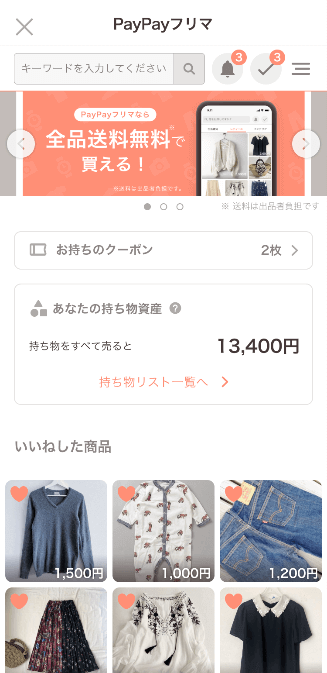
<「PayPayフリマ」ミニアプリ トップ画面>
In addition, items purchased at “Yahoo! JAPAN Shopping”, “PayPay Mall” and “ZOZOTOWN”, as well as personal items photographed with the “Belongings Checker” feature in PayPay Flea Market are all automatically displayed as “assets” in the “item list” in the “PayPay Flea Market” mini app. With this feature, we will promote the circulation of people putting their belongings on sale in the “PayPay Flea Market” app (*3) and then topping up the proceeds to “PayPay”, to be used for the next purchase.
■ Items that will be displayed:
Items purchased in “Yahoo! JAPAN Shopping”, “PayPay Mall”, “ZOZOTOWN” (linking of ZOZO and Yahoo! JAPAN IDs required) .
Items added to the “item list” using the “belongings checker” feature, which enables checking the market price by simply taking a photo of the item in the “PayPay Flea Market” app.
■ Putting items up for sale:
- 1)Tap “Go to Item list” in the “My Assets” page in the “PayPay Flea Market” mini app and display the “Item List”.
- 2)The list of items and will be displayed along with their market prices.
- 3)Tap the “Sell” button to put the item up for sale.
- 4)Tap “Sell in App” that will appear on the lower right corner of the screen.
- 5)”PayPay Flea Market” app users can retain the information in their “Item list” even after being redirected to the “PayPay Flea Market” in-app sale form.
(Users who do not have the “PayPay Flea Market” app, need to go to the app description page and install it)
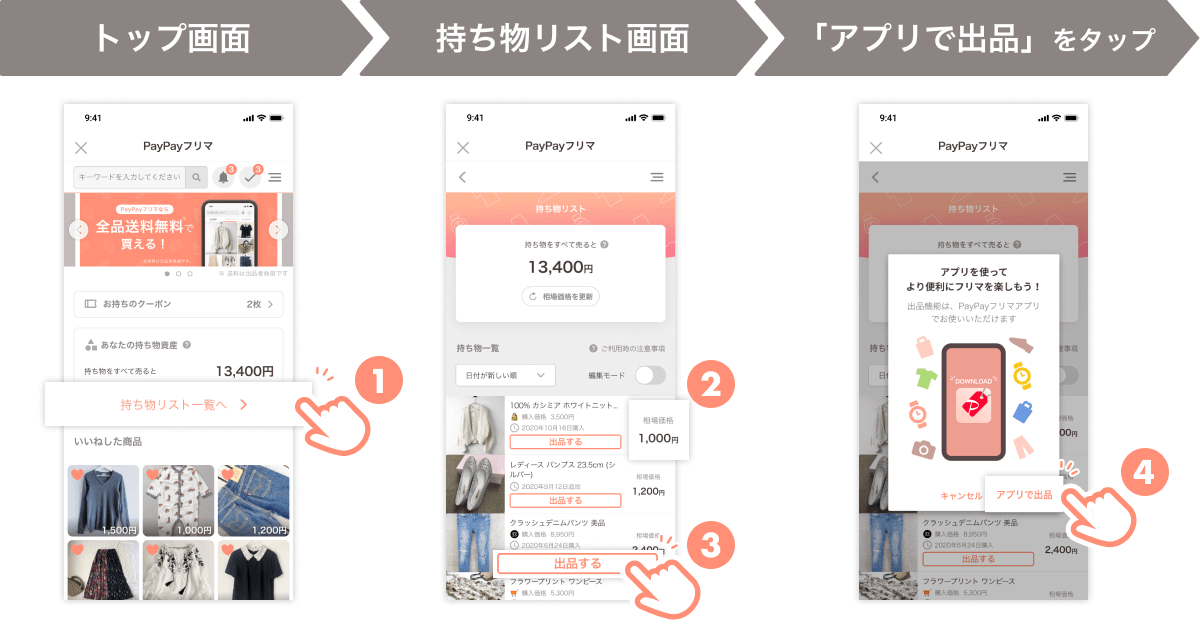
<出品までのステップ>
This feature will first be introduced in the PayPay app to provide better convenience to PayPay users, before being made available in the PayPay Flea Market app.
PayPay will continue to offer the convenience of cashless payments to users as well as all kinds of retailers and service providers, with the goal of creating a world in which a safe cashless shopping experience can be enjoyed anywhere in Japan. “PayPay” will continue on the path to evolve from a “payment app” into a “super app” that will make users’ lives richer and more convenient, fostering a culture of “Anytime, Anywhere with PayPay.”
In addition, “PayPay Flea market” will continue to aim to achieve a world in which users can buy and sell products conveniently and inexpensively, by improving the app and adding more features.
*1: Prices are calculated using market information accumulated in “YAHUOKU!” and “PayPay Flea Market”.
*2: “PayPay Mall” and “PayPay Flea Market” introduced as mini apps in “PayPay”!(Press 1, 2020 press release)
*3: It is necessary to open the “PayPay Flea Market” app from the “PayPay Flea Market Mini App” to sell items.
■ Characteristics of “PayPay”, the cashless payment service provided by PayPay Corporation
PayPay is a cashless payment service expanding across the country, available not only at major chain stores but also at small and medium size retailers, vending machines, taxis and even public transportation. It can also be used in a variety of other scenes, including paying for online services and utility bills. PayPay is also expanding its range of services beyond just payments, including a “send/receive” feature (remittance/transfer and receiving of money) that allows users to transfer their PayPay balance (PayPay Money and PayPay Money Lite) between each other for free, or “bonus management”, a service that allows users access to a simulated investment experience involving the exchange of PayPay Bonus with points provided by a Type 1 Financial Instruments Business Operator that PayPay partners with. The company also strives to create a safe and convenient environment for users through a hotline available 24/7 and a full compensation scheme ensuring, compensation for any damages that may be suffered.
PayPay is registered as follows:
Prepaid Payment Instruments (third party type) Issuer, registration Number : Director-General of the Kanto Finance Bureau, No. 00710
Fund Transfer Operator, registration number : Director-General of the Kanto Finance Bureau, No. 00068
Bank Agency Business, License Number : Director-General of the Kanto Finance Bureau (Gindai) No. 396
* PayPay provides 4 types of PayPay balance: PayPay Money, PayPay Money Lite, PayPay Bonus and PayPay Bonus Lite. PayPay money can be used for payments at partner services and merchants as long as the amount is within the amount deposited into the PayPay account opened after verifying your identity. It can also be used for sending and receiving money between PayPay users free of charge. PayPay can also be cashed out to a designated bank account (no withdrawal fee if using Japan Net Bank). The legal nature of this is an electromagnetic record which can be used to pay for goods and other services, and can be remitted or cashed out, issued by PayPay who is a Fund Transfer Operator registered under Article 37 of the Act on Fund payment. PayPay Money Lite is an e-money issued by PayPay, which can be purchased and used to pay for services and merchants. PayPay users can transfer and receive PayPay Money Lite free of charge. The legal nature of this is a prepaid payment instrument issued by PayPay (Article 3, Paragraph 1 of the Payment Services Act). In addition, PayPay Bonus and PayPay Bonus Lite, which are granted through campaigns and promotions when using PayPay, can be used for partner services and merchants in addition to PayPay Money and PayPay Money Lite. However, PayPay Bonus and PayPay Bonus Lite cannot be sent or transferred between PayPay users or be cashed out. PayPay Bonus Lite has an expiration date.
PayPay also strives to create a safe and secure environment for users. If an unexpected payment is made by a third party using a PayPay account, or if a request to settle a payment suddenly arrives from PayPay to a user that does not have a PayPay account, there is a scheme that ensures compensation for the damages suffered (the difference will be provided as compensation if compensation is also provided by a third party), given that the prescribed conditions are met. Please see applying for compensation for details.
* The company name, trade name, and product/service in this press release are registered trademarks or trademarks of their respective companies.