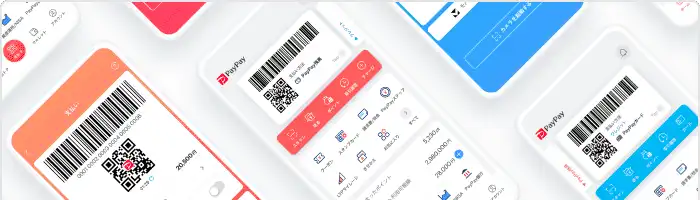


PayPay Corporation (hereinafter “PayPay”) is pleased to announce that, in addition to the available balances of “PayPay Card” and PayPay Points, users will now be able to manage their assets in PayPay’s financial services on the PayPay app’s Wallet. This includes the investment balance and unrealized gains and losses of “PayPay Invest,” the savings in “PayPay Bank,” and the usage and statements of “PayPay Card.”
Previously, Wallet displayed one’s PayPay Balance, usage information, and the available credit for “PayPay Card.” However, from October 11, 2023, information from “PayPay Invest” and “PayPay Bank” will be available in Wallet. And from late October (tentative), “PayPay Card” will display not only the available credit but also the current usage amount and statements. With this feature update, users can easily see all their assets and monthly expenses at a glance, making it easier to see if they are overspending or notice any forgotten payments, making for an even more convenient “PayPay.”
【Wallet screen after renewal】
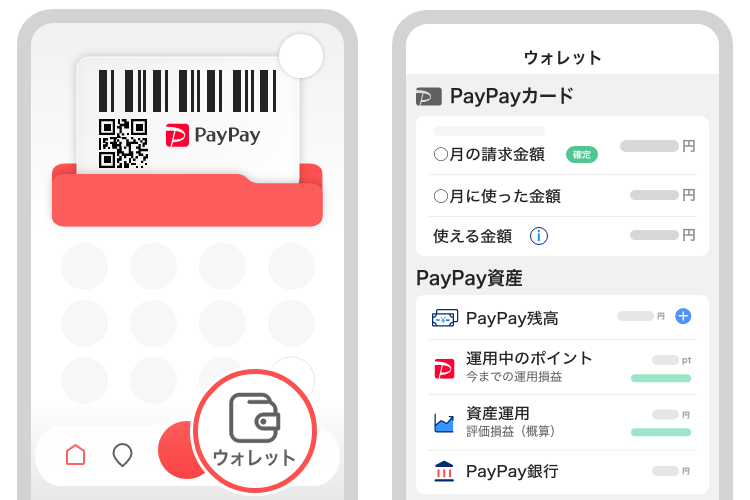
“PayPay” has continued evolving from a payment app to a super app that brings together various convenient features for everyday life. In recent times, the app has further been integrated with financial services, allowing users to access PayPay-branded mini apps*, such as “PayPay Card,” “PayPay Securities,” “PayPay Bank,” and “PayPay Insurance,” from within “PayPay.” Thanks to these efforts, users no longer need other apps but can check information of financial services and manage assets on the PayPay app. While information from the multiple financial services consolidated into Wallet can be viewed on each mini app, to make it easier for users to check their assets and expenditures and to simplify money management, the Wallet screen now includes PayPay Balance and PayPay Points, along with details from “PayPay Card,” “PayPay Invest,” and “PayPay Bank.”
* A mini app is a feature that allows users to smoothly make reservations, order products, and purchase services provided by PayPay’s partner companies from the PayPay app.
After the renewal, the following assets and expenditures can be checked on one Wallet screen
(detailed information on assets can be confirmed from “Breakdown/Withdrawal” (name tentative)).
| “PayPay” | ・Balance ・Points (available points, accumulated points, invested points) ・Recent transaction history |
| “PayPay Card” | ・Billing amount for the current month ・Credit utilization ・Available credit *Information on billing amount and credit utilization will be added in late October (tentative) |
| “PayPay Invest” | ・Investment balance ・Unrealized gain/loss |
| “PayPay Bank” | ・Savings account balance |
Furthermore, the auto top-up feature will be available, and users can add bank accounts from which they top up and cash out their PayPay Money to a registered bank account, all within Wallet. Asset management features will continue to be added, as PayPay aims for more convenience in managing assets and daily spending.
For more information, please click here.
PayPay will continue to offer the convenience of cashless payments to users as well as all kinds of retailers and service providers, with the goal of creating a world in which a safe cashless shopping experience can be enjoyed anywhere in Japan. Moreover, “PayPay” will keep evolving from a payment app into a super app that enriches users’ lives and makes them more convenient, fostering a world where paying “Anytime, Anywhere with PayPay” is a reality.
PayPay is registered as follows:
・Prepaid Payment Instruments (third party type) Issuer (Registration number: Director-General of the Kanto Finance Bureau, No. 00710 / Registration date: October 5, 2018)
・Business Operator that Concludes Contracts on the Handling of Credit Card Numbers, etc. (Registration number: Kanto (K) No. 106 / Registration date: July 1, 2019)
・Telecommunications Carrier (Filing number: A-02-17943 / Date filed: July 2, 2019)
・Fund Transfer Operator (Registration number: Director-General of the Kanto Finance Bureau, No. 00068 / Registration date: September 25, 2019)
・Notified Person Entrusted with Intermediation (Filing number: C1907980 / Date filed: December 18, 2019)
・Bank Agency Services (License: Director-General of the Kanto Finance Bureau (Gindai) No. 396 / Registration date: November 26, 2020)
・Financial Instruments Intermediary Services (Registration number: Kanto Finance Bureau Director (Kinchu) No. 942 / Registration date: June 25, 2021)
・Electronic Payment Agency Services (License: Director-General of the Kanto Finance Bureau (Dendai) No. 109 / Registration date: February 14, 2023)
・Japan Payment Service Association (https://www.s-kessai.jp/, Date of admission: September 12, 2018)
・Japan Consumer Credit Association (https://www.j-credit.or.jp/, Date of admission: July 1, 2019)
* “PayPay” provides 4 types of PayPay balance: PayPay Money, PayPay Money Lite, PayPay Points, and Gift Vouchers.
PayPay Money can be used to pay for partner services and merchants if it is within the amount deposited into the PayPay account opened after completing an identity verification process. It can also be used for sending and receiving money between PayPay users free of charge. PayPay Money can also be cashed out to a designated bank account (no withdrawal fee if using PayPay Bank). The legal nature of this is an electromagnetic record which can be used to pay for goods and services, can be remitted or cashed out, and is issued by PayPay who is a Fund Transfer Operator registered under Article 37 of the Payment Services Act. Based on the provisions of Article 43 of the Payment Services Act, PayPay protects the debt it owes to its users in by depositing assets equivalent to or higher than the debt amount. PayPay Money Lite is an electronic money issued by PayPay, which can be purchased and used to pay for services and merchants. PayPay users can transfer and receive PayPay Money Lite free of charge. The legal nature of this is a prepaid payment instrument issued by PayPay (Article 3, Paragraph 1 of the Payment Services Act). Based on the provisions of Article 14 of the Payment Services Act, PayPay preserves the relevant assets for the purpose of protecting the owners of the prepaid payment instrument by providing a security deposit for issuance to the Legal Affairs Bureau in an amount that is half or more of the unused balance of prepaid instrument methods as of March 31 and September 30. In addition, PayPay Points, which are granted through campaigns and promotions when using PayPay, can be used for partner services and in transactions at merchants in addition to PayPay Money and PayPay Money Lite. However, PayPay Bonus and PayPay Bonus Lite cannot be sent or transferred between PayPay users or be cashed out. PayPay Gift Voucher is a type of electronic money issued by PayPay, which can be used to make payments for affiliated services and merchants designated by the PayPay Gift Voucher. However, it cannot be transferred to other users or cashed out. PayPay Gift Voucher has an expiration date, after which it will no longer be valid. Please confirm the deadline for the policies and campaign specifications for issuing PayPay Gift Vouchers.
PayPay also strives to create a safe and secure environment for users. If an unexpected payment is made by a third party using a PayPay account, or if a request to settle a payment suddenly arrives from PayPay to a user that does not have a PayPay account, there is a scheme that ensures compensation for the damages suffered (the difference will be provided as compensation if compensation is also provided by a third party), given that the prescribed conditions are met. Please see“Applying for compensation”for details.
*Company names, trade names, and products/services in this press release are registered trademarks or trademarks of their respective companies.